AI Face Swap
How AI Face Swap Works
Transform your photos in 3 simple steps with our advanced AI technology
Upload Your Images
Select two images - the target image where you want the face to appear, and the source image with the face you want to swap. Our AI supports all major image formats including PNG, JPG, WEBP, and even animated GIFs.
AI Processing
Our cutting-edge AI technology analyzes both images, detecting facial features with precision. The algorithm seamlessly blends the source face onto the target image while maintaining natural lighting, angles, and expressions.
Download Your Result
Within seconds, your face-swapped image is ready! Download the high-quality result with no watermarks. Create as many face swaps as you want - it's completely free and requires no registration.
Why Choose Our AI Face Swap?
- ✓No registration or sign-up required - start swapping faces instantly
- ✓100% free to use with unlimited face swaps
- ✓High-quality results with no watermarks
- ✓Privacy-focused: your images are processed securely and deleted automatically
- ✓Support for multiple formats including animated GIFs
- ✓Fast processing powered by advanced AI algorithms
Features
Powerful Features for Face Swapping
Experience seamless face swapping with our advanced AI technology. Create face swap gifs and static images instantly, completely free to use.
Create Face Swap gif Animations
Transform your gifs with our AI face swap technology. Upload any gif and swap faces instantly. Our advanced AI face swap gif generator maintains smooth animations while delivering high-quality results.
Realistic Face Swap Results
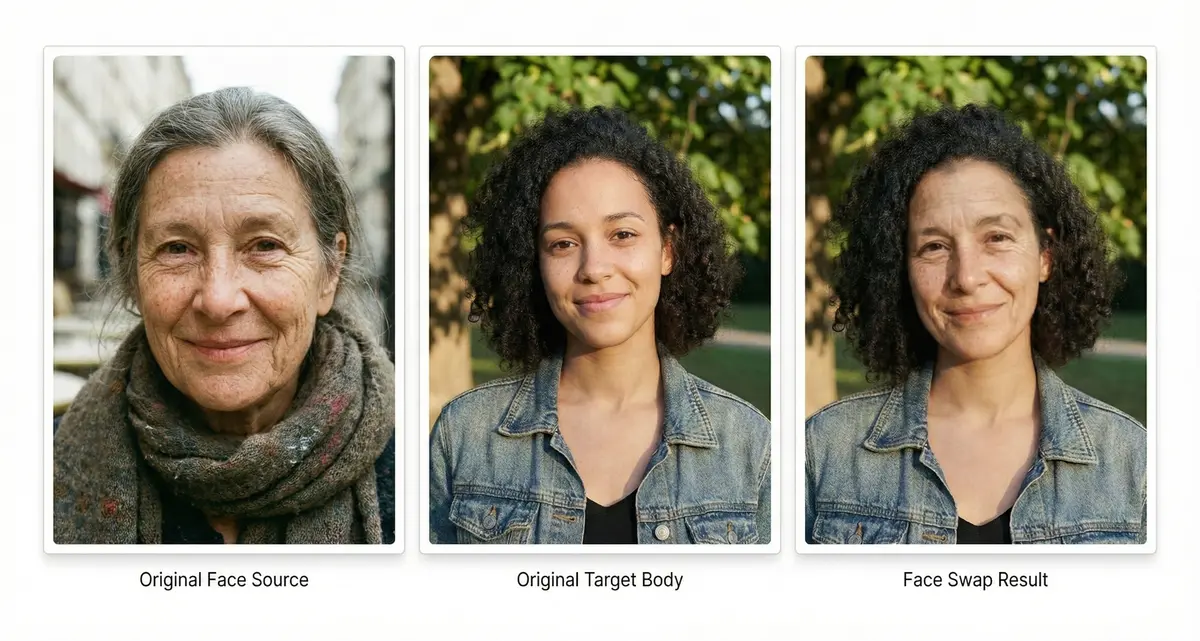
See the power of AI face swap in action. Our advanced technology seamlessly transfers facial features from source to target images while preserving natural expressions, lighting, and skin tones. Perfect for creating professional-quality face swaps with just a few clicks.
Frequently Asked Questions
What is this free face swap tool?
Our free face swap tool uses AI technology to swap faces between two images. Upload your original image and the face you want to swap, and our advanced face swap algorithm will generate a new image instantly.
Can I create a face swap gif?
Yes! Our face swap tool supports gif format. You can upload a gif as your original image and swap faces to create an animated face swap gif. The face swap gif feature maintains the original animation quality.
What image formats does your face swap support?
Our face swap tool supports multiple formats: PNG for high-quality face swap results, JPG/JPEG for common photo face swaps, WEBP for efficient face swap processing, gif for animated face swap effects.
Is this face swap service really free?
Yes, our face swap tool is completely free. You can use all features, including face swap gif creation, without any charges or hidden fees.
Do I need to register to use the face swap tool?
No registration required! Our face swap service is instantly accessible. Just upload your images and start creating face swaps immediately.
Will there be watermarks on my face swap results?
No watermarks! Your face swap results, whether static images or face swap gif, will be clean and watermark-free.
How do I create the best face swap results?
For optimal face swap quality: Use clear, well-lit images, ensure faces are clearly visible, choose similar face angles, for face swap gif, use high-quality source files.
How long does the face swap process take?
The face swap process typically takes just seconds. Even for face swap gif creation, our AI processes the images quickly and efficiently.
Is my data safe when using your face swap tool?
Absolutely! Our face swap service prioritizes privacy: No image storage after face swap completion, secure processing of face swap requests, immediate deletion of uploaded images, private face swap result generation.
What's the maximum file size for face swap?
For optimal face swap performance: Static images: up to 5MB, Face swap gif files: up to 10MB, Supported dimensions: up to 2048x2048 pixels.
Why choose our face swap tool?
Our face swap service stands out because: Free face swap generation, no login required for face swaps, clean, watermark-free results, supports face swap gif creation, instant face swap processing.
How can I download my face swap result?
After your face swap is complete: Click the download button below your face swap result, for face swap gif, the animation is preserved, save your face swap creation to your device, share your face swap freely.
What if my face swap doesn't look right?
If your face swap result isn't perfect: Try different face angles, ensure good lighting in both images, for face swap gif, check frame quality, upload clearer images for better face swap results.